

A B2B founder running a specialised dev agency was doing outbound the hard way. Every morning, he’d open LinkedIn Sales Navigator, run the same saved searches, scroll through profiles, and copy prospect details into a Google Sheet.
Then he’d open each company’s website in a new tab, scan their about page and recent news, and write a personalised email from scratch.
One by one. For every single lead.
He was spending 12 to 15 hours a week on this. Prospecting on Monday and Tuesday. Writing emails on Wednesday. Following up on Thursday. Updating his spreadsheet on Friday. And booking maybe 2 meetings a month. Good meetings, with founders who genuinely needed his team. But not nearly enough to replace the referral pipeline that had quietly dried up over the past year.
He’d looked at agencies. One quoted him $4,500/month with a 3-month minimum. Another wanted $6,000 plus a setup fee. Both pitched “guaranteed meetings” but couldn’t explain what happened to the data and the learnings when the contract ended.
He’d looked at hiring a junior SDR. The maths didn’t work: $60,000 base, 3 to 6 months before they’d book a single meeting, and he’d need to build the entire playbook for them anyway.
We installed this system in his business over 8 weeks. Same founder. Same offer, market, and ICP. The only difference: AI now handles the list building, research, enrichment, and first drafts. He reviews, edits where needed, and approves. Nothing goes out without his eyes on it.
After 60 days: his pipeline went from 2 meetings a month to 8 to 10. His time on outbound dropped from 15 hours a week to under 4. His total tool cost: $580/month. No complex 12-tool stack.
The system you’re about to read is the same one we built together. It’s not a theory, but a working pipeline blueprint that B2B founders at $1M to $10M ARR are using right now to generate consistent new business without a full sales team, without agencies, and without spending half their week on manual prospecting.
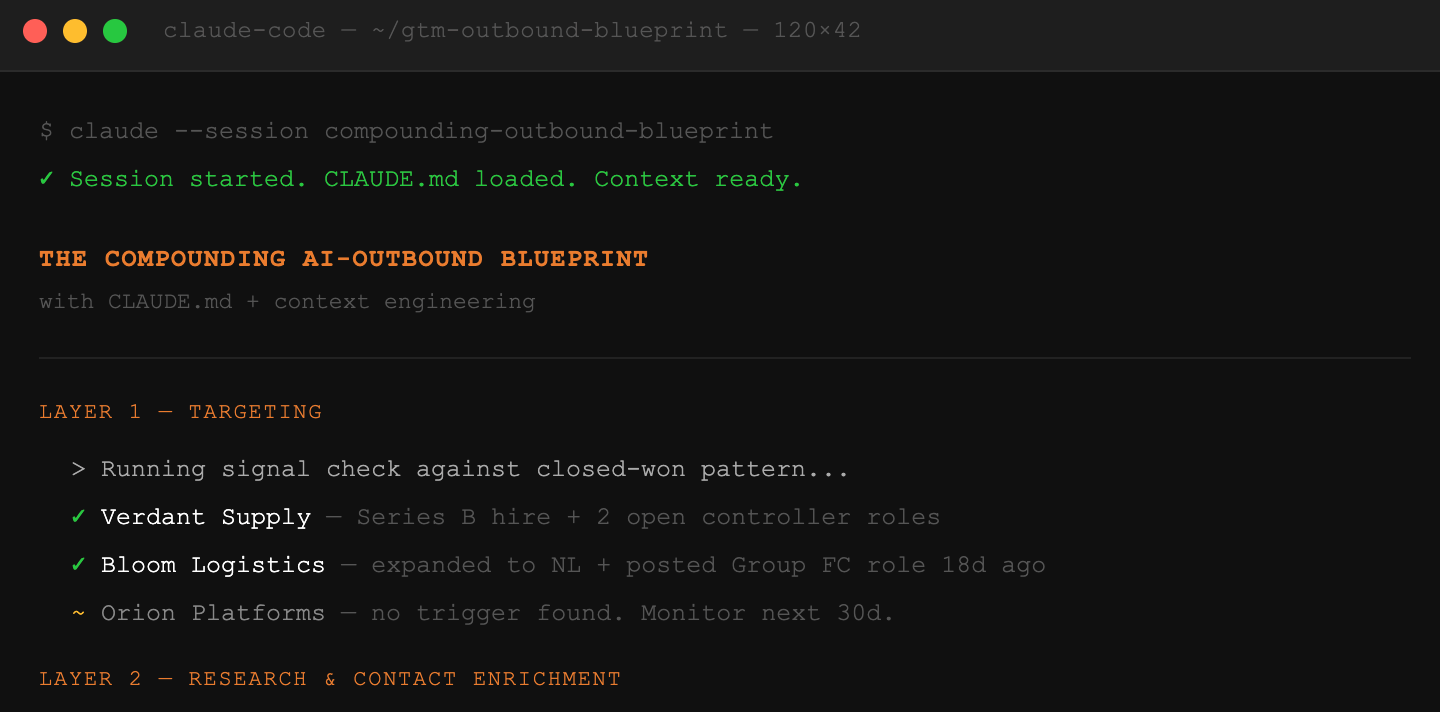
The system has five layers. Each layer does one job. Together, they replace the $5,000/month agency retainer and the $120,000/year sales hire with something that costs less than $1,000/month and gets smarter every time you run it.
Layer 1: Targeting. AI builds your prospect list from public data based on your exact buyer criteria. No expensive database subscriptions required.
Layer 2: Research and enrichment. Connected to a lead enrichment tool, AI researches each company, finds the right contact, and documents why they’re a fit before you write a single word.
Layer 3: Messaging. AI drafts personalised outreach based on what it found, using a proven framework you’ll learn about here, your voice, your proven angles, and your rules. You review and approve.
Layer 4: Sending infrastructure. Emails go out through properly warmed domains with deliverability handled. They land in the primary inbox, not in spam.
Layer 5: Signal-based follow-up. AI tracks who engaged. Hot leads appear automatically. You focus on conversations instead of chasing.
The rest of this guide breaks down each layer: what tools to use, what it costs, how to set it up, and where to go deeper.
The AI Stack: What You Need and What It Costs
Before getting into the layers, here is the full stack. Three tools. That’s it.
Claude Code ($20 to $100/month): Your AI agent. It builds lists, researches prospects, drafts emails, and manages files. It doesn’t just suggest what to do. It does it. It opens your tools, runs searches, creates files, fixes its own errors, and works through tasks from start to finish.
Apollo, Prospeo, or LinkedIn Sales Navigator ($99 to $200/month): Your contact data source. Contact information, company data, and job change signals. Apollo/Prospeo is better for email-first outbound. Sales Navigator is better if your buyers are active on LinkedIn.
Smartlead or Instantly ($50 to $150/month): Your email sending infrastructure. Domain warm-up, email sequencing, deliverability monitoring, and reply tracking.
Total: $170 to $450/month for the core stack.
Add Clay ($150 to $300/month) if you need workflow orchestration and multi-source enrichment at higher volume. Even at the top end, you’re under $1000/month.
Compare that to the alternatives:
A lead generation agency: $3,000 to $5,000/month. Pipeline stops when the contract ends. You own nothing.
An SDR hire: $80,000 to $120,000/year fully loaded. Takes 3 to 6 months to ramp. No guarantee of results.
An AI SDR tool (Artisan, AiSDR, etc.): $300 to $1,000/month. Automates sending but has zero context about your business. Generates volume without compounding.
The system below costs less than any of these and compounds because every campaign makes the next one better.
For the complete tool-by-tool breakdown, including what to use when and what to skip, read The only GTM tools you need in 2026.
This is the free edition of Founder’s GTM 🦊.
Founders on the paid version get access to all Claude GTM guides, Outbound Playbooks, and proven Frameworks.
The Brain: Why This System Gets Smarter Over Time
Every AI SDR tool on the market has the same problem: it knows almost nothing about your business. It sends emails based on templates and public data, but it has no real context about your buyer, your voice, your past campaigns, or what has worked before. Every campaign starts from zero.
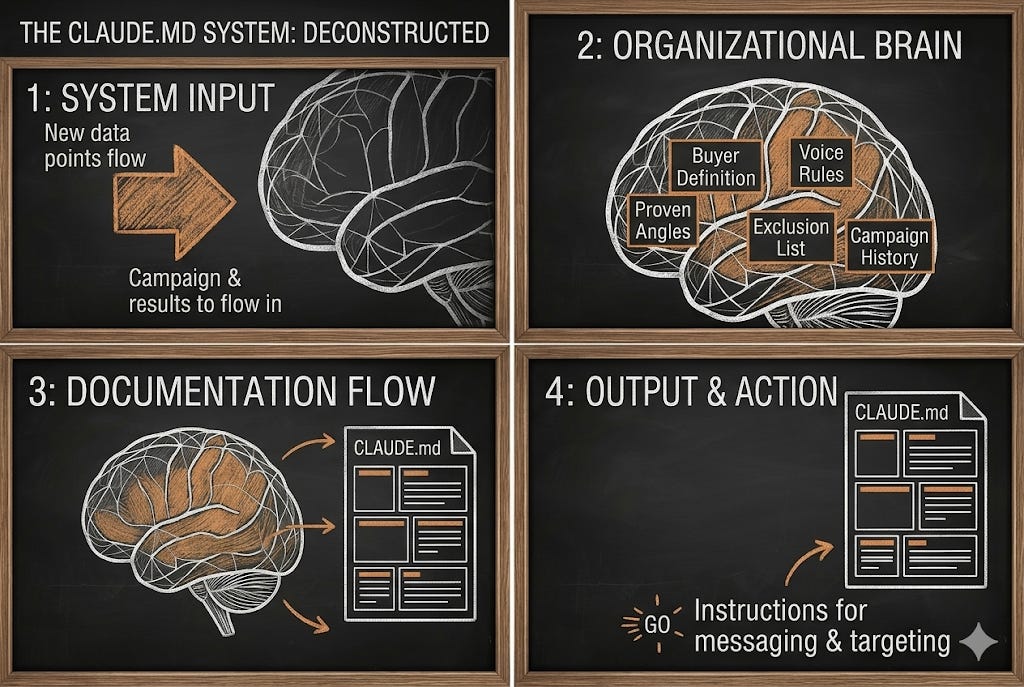
This system is different because of one file: your CLAUDE.md.
A CLAUDE.md file is a structured document that serves as the operating memory of your entire GTM system. It is loaded automatically into every Claude Code session and contains:
Your buyer definition. Not “B2B SaaS companies with 50 to 500 employees” but the specific title, company situation, and breaking point that makes someone a real buyer this week.
Your voice rules. Three to five concrete rules that make every email sound like you wrote it, not like AI generated it.
Your proven angles. Subject lines and opening lines that got replies. Messaging approaches that converted. These get added after every campaign.
Your exclusion list. Company types, industries, and geographies that never convert. Write them down once and the system skips them automatically.
Your campaign history. What you sent, to whom, what happened. The AI reads this before drafting anything new.
This file starts small. After 30 days of campaigns, it becomes the most valuable sales asset in your business. After 90 days, your AI agent knows your market better than any SDR you could hire.
For the full breakdown on building a CLAUDE.md and the four components of an AI-ready GTM system, read Context engineering: the GTM skillset that makes outbound compound.
For the practical setup walkthrough of Claude Code, start with Claude Code for GTM: the first steps.
Layer 1: AI-Powered Targeting
Traditional prospecting works like this: you log into a database, set some filters (title, industry, company size), export a CSV of 500 names, and start emailing. The list is generic. The targeting is surface-level, and the reply rate reflects it.
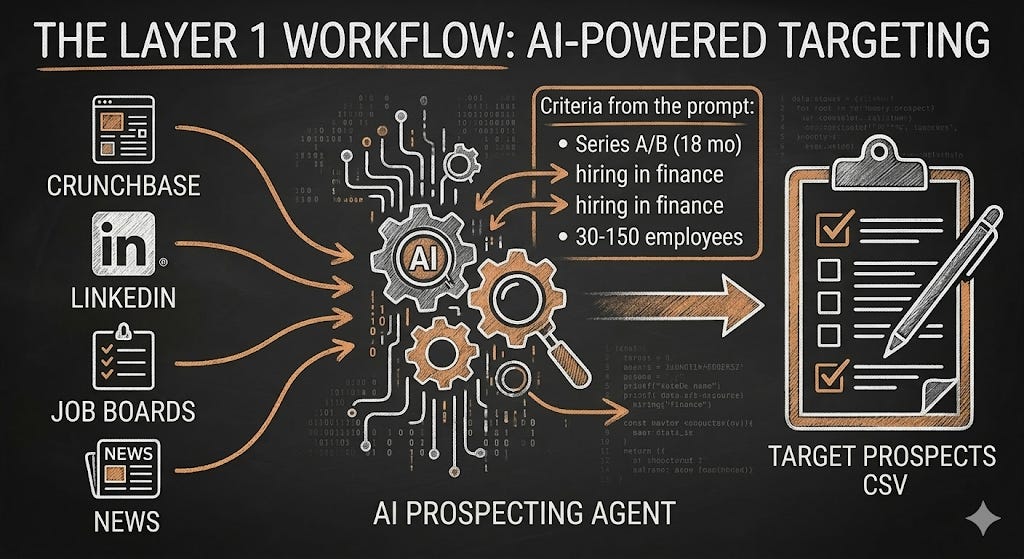
AI-powered targeting works differently. Instead of filtering a database, you describe your exact buyer to Claude Code and it searches public sources to find companies that match.
The instruction looks like this:
“Find 30 B2B SaaS companies in the UK that raised a Series A or B in the last 18 months, have 30 to 150 employees, and are currently hiring in their finance function. For each company, record the company name, domain, funding stage, employee count, evidence of the hiring signal, and source URL. Save to companies.csv.”
Claude Code searches sources like Crunchbase, LinkedIn, job boards, company websites, and news coverage. It doesn’t guess. If it can’t verify your criteria from a public source, it skips the company. The result is 30 to 50 companies where every row has a documented reason for being there.
This replaces the $200/month database subscription and produces a higher quality list because every company has verified fit evidence, not just a matching job title.
For the full targeting framework, including the WHO/WHY/WHEN model and the Claude Code prompt you can run today, read How to source high-quality leads.
For the deeper guide on defining a buyer profile that actually converts, read How to find customers that actually buy.
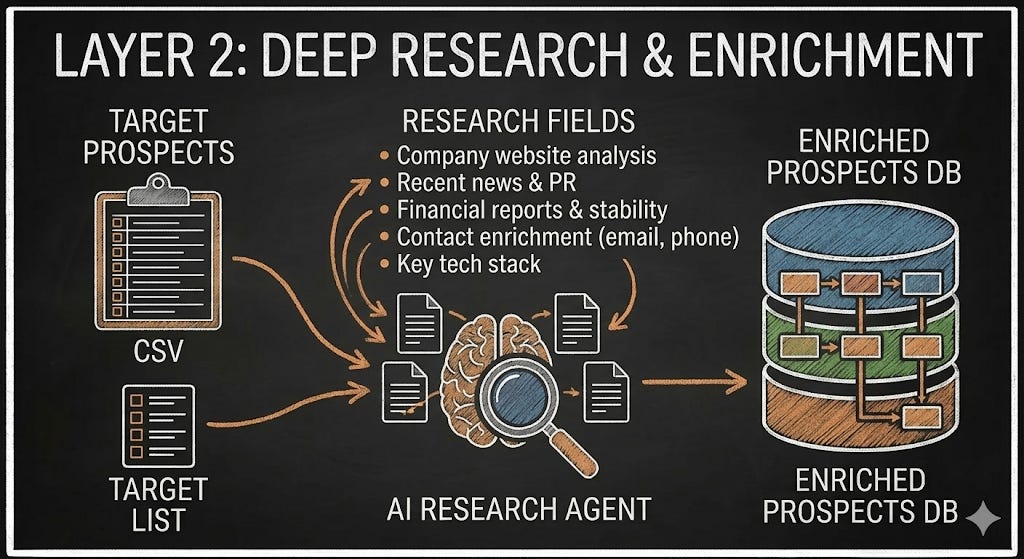
Layer 2: AI Research and Enrichment
You have a list of 30 to 50 target companies. Now the system needs to find the right person at each company, get their contact details, and build a brief on why they’re worth reaching out to.
In a traditional setup, this is 2 to 3 hours of manual research per batch. A junior SDR does this all day. In this system, Claude Code does it in minutes.
The instruction: “Take companies.csv. For each company, find the CEO or founder. Get their email from Apollo or Prospeo. Research their company website and recent news. Write a one-sentence, relevant personalisation note explaining why we’re reaching out. Save everything to prospects.csv.”
Claude Code connects to Apollo via API, pulls contact data, then researches each company using web search. It produces a CSV where every row has: name, title, email, company, personalisation note, and fit score.
If you need deeper enrichment across multiple data sources (combining Apollo, LinkedIn, Crunchbase, and company websites into a single view), Clay is still the best tool for that. The decision depends on volume. If you’re running fewer than 500 prospects per month, Claude Code with Apollo is enough. Above that, Clay adds value.
For a specific comparison, read Do you still need Clay in 2026?
Layer 3: AI-Drafted Messaging
This is where most AI outbound fails. Tools like Artisan and AiSDR generate emails from templates and data. They’re grammatically correct but contextually empty. They read like AI wrote them because AI wrote them without knowing anything about the sender’s business.
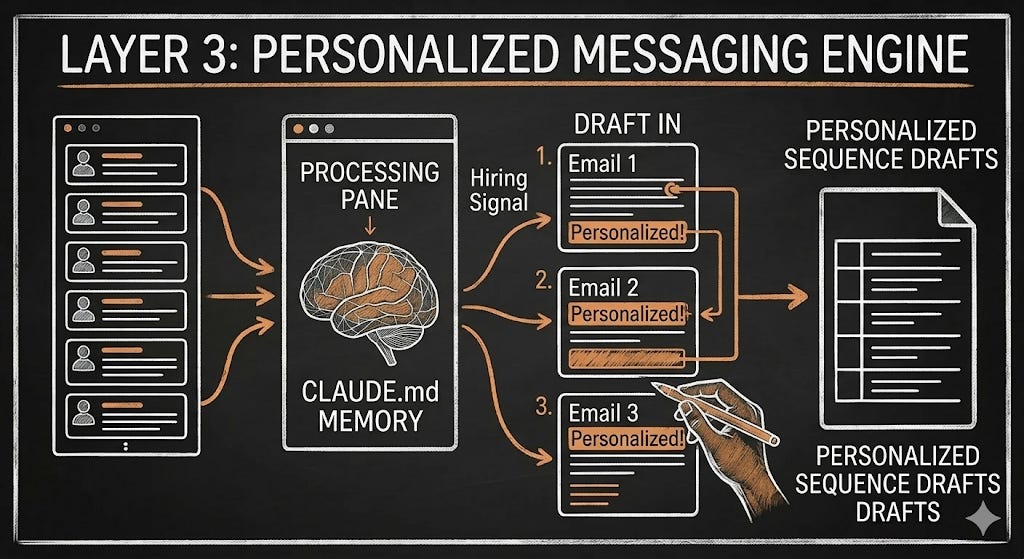
The CLAUDE.md file fixes this. Because Claude Code loads your buyer definition, voice rules, and proven angles before drafting anything, the output sounds like you.
The instruction: “Using prospects.csv and the cold email Skill, draft a 3-step email sequence for each prospect. Email 1: reference the specific signal from their personalisation note. Connect it to the pain point from the CLAUDE.md. End with a single ask under 10 words. Total length: under 80 words. Save all drafts to review-drafts.csv. Do not send anything.”
Claude Code writes the sequences, follows your rules, and saves everything for your review. You read through, make edits where needed, and approve. Nothing reaches a real prospect until you’ve signed off.
This is the critical difference between this system and every AI SDR tool: you stay in control of the message. The AI handles the labour. You handle the judgment.
For the detailed breakdown of the 3-step email sequence structure, read The cold email sequence that builds pipeline.
For the messaging principles behind emails that get replies, read Outreach copy that converts.
Layer 4: Sending Infrastructure
None of the above matters if your emails land in spam. Deliverability is invisible work that makes everything else possible.
The setup:
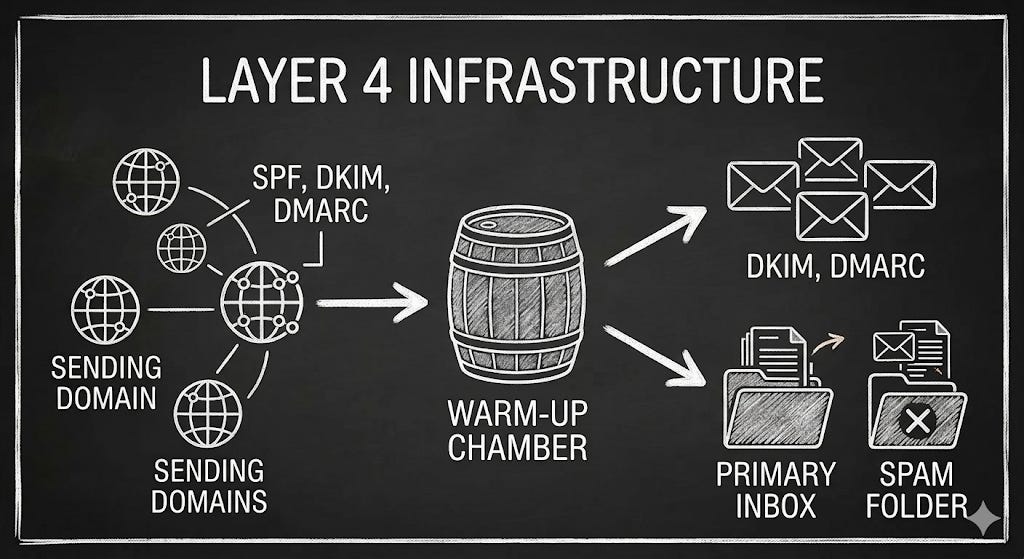
Separate sending domains. Never send cold outreach from your primary domain. Buy 2 to 3 variants (e.g., if your domain is acme.com, buy getacme.com and acme-mail.com). Cost: $10 to $15/year each.
Authentication. Configure SPF, DKIM, and DMARC on every sending domain. Without these, inbox providers flag your emails before a human sees them. Your sending tool (Smartlead or Instantly) walks you through this.
Warm-up. New domains need 2 to 4 weeks of warm-up before sending cold email. Smartlead and Instantly both have built-in warm-up that handles this automatically.
Volume limits. Stay at 30 to 50 emails per day per inbox. With 2 to 3 domains and 2 to 3 inboxes each, your total daily capacity is 150 to 300 emails. That’s more than enough for a founder-led system.
Load your approved sequences from Layer 3 into Smartlead or Instantly, set the sending schedule, and the emails go out automatically.
For the full deliverability walkthrough, including technical setup and the mistakes that land you in spam, read How to land in the primary inbox.
For what actually drives open rates (it’s not subject lines), read How to get your cold emails opened.
Layer 5: Signal-Based Follow-Up
Most prospects won’t answer to cold emails. But silence doesn’t mean no.
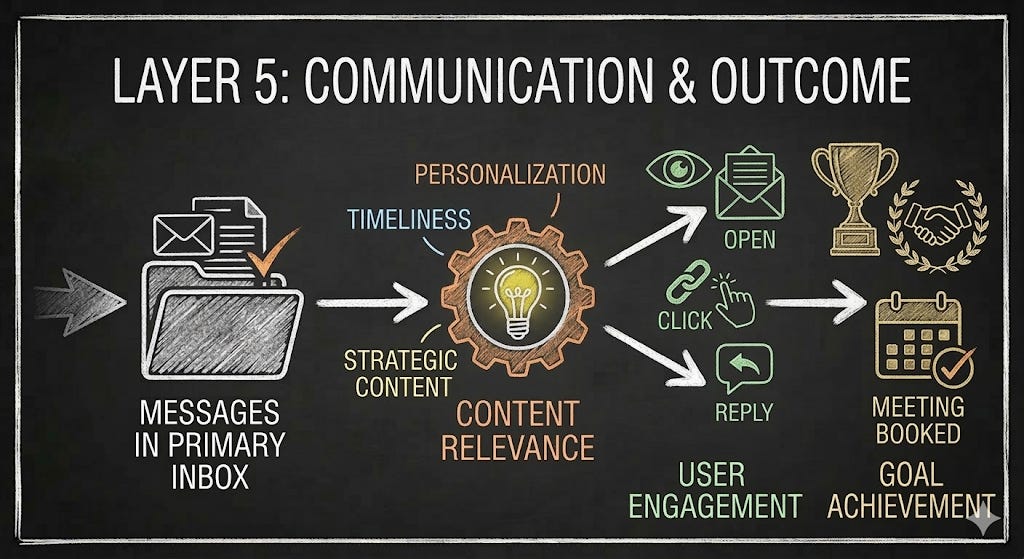
A prospect who opened all three emails, clicked the link in Email 2, and visited your website or landing page is a warm lead. They just didn’t reply yet. In a traditional setup, that signal is invisible. In this system, it’s tracked and surfaced automatically.
When a prospect engages but doesn’t reply, they go into a warm follow-up queue. The follow-up is different from the original sequence: a phone call referencing the resource they clicked, a LinkedIn connection request, or a short direct email acknowledging their interest.
This is where most of the meetings actually come from. Not from Email 1. It comes from intelligent follow-up based on engagement data.
For the complete signal-based follow-up process, read Turning cold emails into warm pipeline.
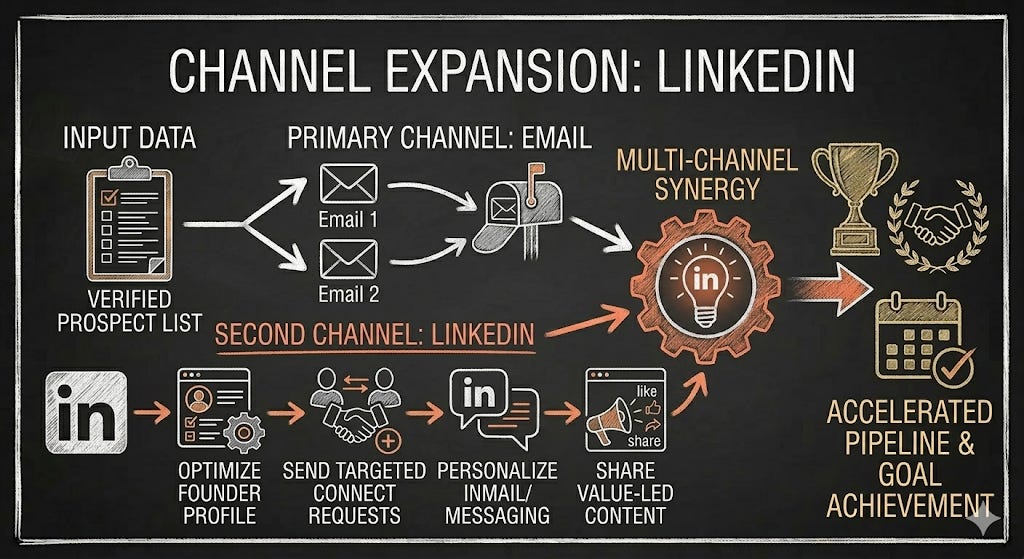
Adding LinkedIn as a Second Channel
If your buyers are active on LinkedIn, LinkedIn becomes a parallel pipeline channel that amplifies your email outreach.
The system is the same: targeted connection requests, personalised messages based on AI research, and signal-based follow-up. Claude Code handles the research and drafting. You handle the sending using tools like HeyReach or Prosp.ai.
Supporting deep dives:
The first step to making LinkedIn pay off: the foundation most founders skip.
LinkedIn account-based targeting with job alerts: using hiring signals as intent data.
Collecting LinkedIn leads on autopilot: scaling beyond manual prospecting.
Turning connections into sales conversations: warm outreach that converts.
The Timeline: From Zero to Pipeline
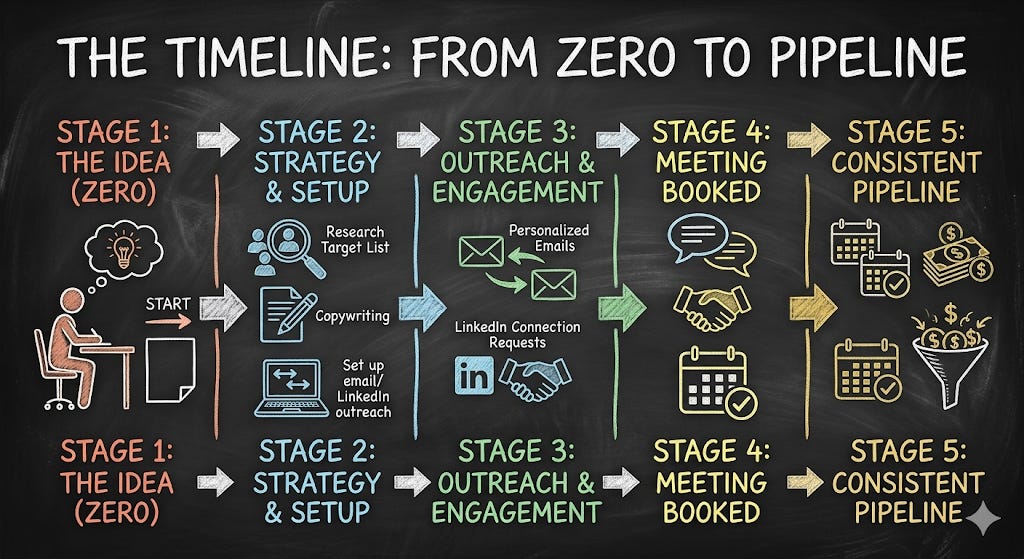
Week 1: Set up Claude Code, create your CLAUDE.md file, connect Apollo. Buy sending domains.
Week 2: Domain warm-up begins (runs in the background). Build your first target list with Claude Code. Draft your first sequences. Review and refine.
Week 3: First emails go out. Start with 20 to 30 per day. Track deliverability closely.
Week 4: Ramp to full volume (100 to 200 per day). First replies arrive. First meetings booked.
Weeks 5 to 8: Run 2 to 3 campaign cycles. Update your CLAUDE.md with what’s working. Targeting gets sharper. Messaging gets better. The system starts compounding.
Week 9 onwards: The system is operational. You spend 3 to 5 hours per week reviewing AI output, approving sequences, and taking meetings. The AI handles the rest.
When to Hire (And When Not To)
This system is designed to be run by a founder. But at some point, the question becomes: should I hand this off?
The answer is specific. Hire only after you have:
A CLAUDE.md file with at least 3 months of campaign data.
A tested messaging sequence with documented reply and conversion rates.
A working stack that someone else can operate without rebuilding.
Consistent pipeline generation of 5+ meetings per month.
Without these, you’re paying someone to figure out your outbound from scratch. That’s a $120,000 experiment. With these, you’re handing someone a machine that already works. That’s a $60,000 hire who produces results in month one.
For the detailed hiring framework, read When to hire a GTM engineer and Should you hire a GTM strategist?
Common Questions
Q: How much does this system cost per month?
The core stack (Claude Code + Apollo + Smartlead) costs $170 to $450 per month. Adding Clay for advanced enrichment brings the total to $450 to $900. Even at the top end, the system runs for under $1,000/month. This replaces agency retainers of $3,000 to $5,000/month or an SDR salary of $80,000 to $120,000/year.
Q: How many meetings per month should I expect?
A well-targeted system sending 100 to 200 emails per day to a precise ICP typically produces 5 to 15 qualified meetings per month. The conversion rate from first email to booked meeting is roughly 1% when targeting is sharp. Founders who report lower numbers almost always have a targeting or deliverability problem, not a volume problem.
Q: Do I need Clay or is Claude Code enough?
For most founders running fewer than 500 prospects per month, Claude Code with a lead enrichment tool like Apollo handles targeting, research, and enrichment without needing Clay. Clay adds value when you need to combine multiple data sources into a single workflow at higher volume, or when your enrichment logic has complex conditional steps (e.g., “check LinkedIn first, then Crunchbase, then company website, use whichever has the most recent data”).
Q: Why not just use an AI SDR tool like Artisan or AiSDR?
AI SDR tools automate sending but lack context about your business. They don’t know your buyer, your voice, or what worked in previous campaigns. Every campaign starts from zero. The system in this guide compounds because your CLAUDE.md file carries all context and learnings forward. After 90 days, your system knows your market better than any external tool. AI SDR tools are useful only after you have a proven playbook you want to scale beyond what you can manage. It’s a pure volume game.
Q: Is this GDPR-compliant for European outreach?
B2B cold email is legal under GDPR when the legal basis of “legitimate interest” applies. This means: only contact people in their professional capacity at their business email, include a clear opt-out in every message, honour unsubscribe requests immediately, and be transparent about who you are and why you’re reaching out. The system described here is designed for targeted, relevant outreach to specific buyers, which is the strongest basis for legitimate interest.
Q: Can I really set this up without technical skills?
Yes. Claude Code operates through natural language. You type instructions in plain English and the agent executes them. “Find 30 SaaS companies in the UK that raised funding in the last year” is a valid instruction. You don’t write code. The initial setup (installing Claude Code, connecting APIs) requires running a few terminal commands, but Claude walks you through each step.
Q: How much time does this take per week once it’s running?
Once the system is operational (after the first 4 to 6 weeks of setup and initial campaigns), most founders spend 3 to 5 hours per week. That time goes to: reviewing AI-drafted sequences before they send, taking meetings with qualified prospects, and updating the CLAUDE.md with new learnings. The AI handles list building, research, enrichment, and drafting.
This guide is updated regularly as tools and tactics evolve. Every section links to a detailed deep-dive you can work through at your own pace.
This is the free edition of Founder’s GTM 🦊.
Founders on the paid version get access to all Claude GTM guides, Outbound Playbooks, and proven Frameworks.