This new GTM skillset makes outbound work
I have yet to meet a founder who said their AI outbound is compounding.
Most build a campaign, send it out, get inconsistent results, and start over. Six months in, the AI knows nothing more about their business than on day one.
Take your mind back to late 2022. ChatGPT launches and everyone suddenly has an AI writing assistant. A few months later, most have quietly gone back to writing emails themselves. The output was generic. It could have been written for any company selling anything to anyone.
The founders who got real results figured out something everyone else missed: They stopped treating AI like a search engine and started treating it like a new team member who needed proper onboarding before touching anything important.
That shift is called Context Engineering. The difference between outbound that plateaus and outbound that compounds.
Generative vs Agentic AI
Every AI tool that we have used so far, ChatGPT, Gemini, the standard Claude interface, works the same way. You type something. It responds. You type something else. It responds again. The conversation ends, the tab closes, and nothing happened in the real world.
This is generative AI. It is genuinely useful for drafting, thinking out loud, summarising.
For GTM work that involves actually doing things, pulling data, building lists, enriching contacts, writing and organising files, it has a hard ceiling. The AI can tell you what to do, but it cannot do it for you.
Truly Agentic AI is different. And with that I don’t mean ‘AI agents’ that are simply a layer over an automated workflow. Instead of responding to your messages, a real agent takes actions. It opens your tools, runs searches, creates files, fixes its own errors, and works through a task from start to finish without you babysitting every step.
The practical difference for a founding team:
Conversational AI: “Here is a Python script that will pull your Apollo data.” You copy it, realise you do not know how to run it, close the tab.
Agentic AI: writes the script, runs it, handles the errors, and puts the finished CSV on your desktop. You never saw the code.
Claude Code is the first agentic AI built specifically for this kind of work. It does not just answer questions. It also executes tasks, inside your tools, on your files, in your project folder, while you focus on something else.
Prompt vs Context Engineering
A founder I worked with had been using Claude for outbound for three weeks. Clean list, clear ICP, personalised emails. His reply rate was 0.6%.
When I looked at his setup, the issue was not obvious at first. His emails were good. His targeting was solid. What was missing was compounding.
The angle that got two replies on Tuesday was not informing Thursday. The segment converting at twice the rate was not getting more attention. Every session started from the same baseline as the first one.
This is Prompt Engineering in practice. Ask the right question, get a decent answer, close the tab, repeat. It works for one-off tasks. For outbound that needs to improve over time, it keeps resetting you to zero.
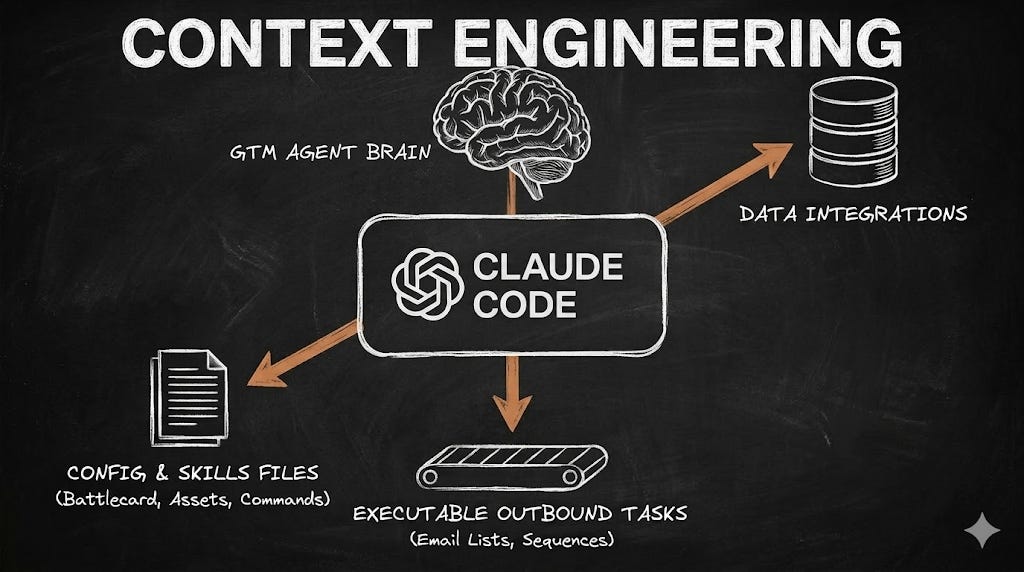
Context Engineering fixes this. Your ICP, your voice, your best-performing angles, your campaign learnings, all of it loaded automatically before you type a single word. You’re no longer rewriting from scratch but start reviewing and approving.
The Four Things Your GTM System Needs
1. CLAUDE.md: The Brain
This is your CLAUDE.md file from the Claude Code first steps. The part most people miss: it should grow with every campaign, and not sit static after the first setup.
When a sequence gets a 7% reply rate, that angle goes in the file. When a segment consistently fails to convert, that goes in too.
Over time, this becomes your GTM memory, loaded automatically into every session before you type a single word.
For founding teams getting started, it needs to cover:
Your actual buyer. The title, company size, and situation that makes someone a live prospect right now.
The real problem you solve. Written the way your buyer would describe it, not the polished version from your website.
Your voice. Three or four concrete rules so the copy sounds like you.
What has worked. Subject lines, angles that drove replies, follow-up timing that got responses.
Who wastes your time. Company types, industries, geographies that never convert. Write them down once and the system skips them forever.
2. Skills: Playbooks for Every Task
Every team has a way they like their outbound done. A cold email structure that fits their buyer. A research process before writing to a prospect. That process lives entirely in their head, which means re-explaining it every single session.
Claude Code has a built-in feature for this called Skills. A Skill is a text file that holds the exact instructions for one specific, repeatable task. You save it in a dedicated folder inside your project, and Claude reads it automatically whenever that type of task comes up.
To set one up, create a folder called .claude/commands inside your project directory. Inside that folder, create a file called cold-email.md. That file is now a Skill. Every time you type /cold-email inside a Claude session, it loads those instructions and applies them to the task at hand.
A cold email Skill might look like this:
Use this structure for every cold email:
- Line 1: Reference the specific signal you found for this prospect.
One sentence, nothing else.
- Line 2: Connect it to the pain point from the ICP section of CLAUDE.md.
One or two sentences, no feature lists.
- Line 3: A single low-friction ask. Under 10 words.
Rules:
- Total length: under 80 words.
- No pleasantries, no company history, no mention of AI or automation.
- Subject line: 4 words or fewer.
You write it once. From that point, every email follows your structure, on every lead, without a single reminder. Each Skill you add makes the system faster and the output more consistent.
Over time, your .claude/commands folder becomes a library of your entire outbound methodology, ready to deploy on demand.
3. MCP Servers: Stop Being the Middleman
Until now, your relationship with every tool in your stack has looked the same. You log in, export something, paste it somewhere else. Apollo gives you data. You move it to Clay. Clay enriches it. You move it to your CRM. The tools do their jobs, but you are doing all the connecting.
This is what it means to be a User. You are the middleman between every platform you pay for.
Claude Code changes this through APIs and MCP servers. Both sound technical. Neither requires you to write a single line of code.
APIs are the back doors that every tool you already pay for, Apollo, Clay, HubSpot, has built in. Claude Code uses them to log into your tools directly, pull data, run enrichment, and save the output without you opening a single tab.
MCP servers are the instructions that tell Claude how to use each tool properly. You install them once with a single terminal command. After that, Claude knows exactly how to talk to Apollo, query Clay, and pull from your CRM.
In practice it looks like this: you type “Find 30 B2B SaaS founders in the UK with 10 to 50 employees who posted a Head of Sales role in the last 30 days. Pull the CEO name from Apollo. Enrich with Clay. Save to leads.csv.” Claude logs into Apollo, runs the search, pulls the data, passes it to Clay, and saves the finished file to your desktop.
You gave an instruction and reviewed the output. You did not touch a single tool. That is the shift from User to Manager.
The two connections worth setting up first:
Apollo MCP: prospect search and contact data pulled directly by the agent based on your ICP.
Brave Search: free live web access for signals, recent news, funding rounds, and job postings.
Both install with a single terminal command and Claude walks you through it.
4. Rules That Stop Mistakes
Speed is the entire point of a system like this. It is also where reputations get damaged when nobody is paying attention.
The classic failure: the agent personalises an email referencing a company’s “exciting recent news.” The news was a round of redundancies. The opening line congratulates the CEO on the changes. The reply you get is not a meeting request.
Rules are automated checks that fire before or after the agent takes any action. Three every founding team needs before going anywhere near scale:
Batch review. Agent processes 10 leads, stops, waits for approval. You catch problems at row 10, not after the whole list has run.
Locked documents. Your approved messaging, your domain settings, your finalised copy. The agent reads them but cannot touch them.
Drafts gate. All outbound copy goes to a review file first. Nothing reaches a real prospect until you have read it and said yes.
Type /hooks inside a Claude session and it walks you through the setup interactively.
The Takeaway
In late 2022, many teams tried ChatGPT for outbound, got generic output, and moved on. The ones who stayed built context around the AI, not just prompts into it. Their output compounded. Everyone else reset every session.
The same split is happening right now with Claude Code. The teams pulling ahead have simply changed their relationship with the tool. They stopped being Users, clicking between tabs, re-explaining their business every session. They became Managers.
Managing an AI well is a completely different skill than using one. Think about onboarding a junior hire. You would not hand them a task and hope for the best.
You would train them properly, give them a process to follow, and set a clear quality standard. The better the onboarding, the less you have to supervise. The less you supervise, the more they compound.
Context Engineering is that onboarding. Get it right once and the system runs without you having to repeat yourself.
PS: Founders often read this, think “I’ll set this up this weekend,” and don’t touch it for months.
Another quarter passes with identical pipeline as the last one, the same referral dependency, and the feeling that outbound should be working but somehow never does.
The GTM Agent Starter Pack exists for that reason. Everything is documented, and ready to drop into your project folder. CLAUDE.md template, Skills files, MCP setup, Rules template. One hour of work instead of days.
Get it here and revamp your GTM with Claude Code.


