



Last week I spoke with an agency owner who had spent two hours tweaking a prompt, trying to get Claude Code to produce a better prospect list.
Different phrasing, different structures, longer instructions. But nothing really worked.
I asked him what he had loaded in before the prompt ran. He looked at me blankly.
There is a difference between prompt engineering, which is about phrasing the instruction better, and context engineering, which is about what your LLM knows before you type a word: Your ICP, your closed-won deals, your signal criteria.
When that context is in place, the prompt becomes almost secondary. Four lines produce better output than forty, because the context sitting underneath them is doing the real work.
The three prompts I’m sharing today are starting points, not a system, yet.
Each one covers a different layer of GTM: finding the right place at the right moment, finding the right person, and writing the right message.
1. The signal check: right place, right time
Requires:
a company name/domain
your best existing customers to seed from
the specific pain signals you are looking for
a rough sense of your ICP and breaking point
Before you search for new companies, start with what you already know. Your best customers are the benchmark.
The goal is to find companies in the same situation those customers were in when they first bought, and then confirm the timing is right by checking for active pain signals right now.
You can learn everything about it in the Account List Building Guide.
Example input:
You are a GTM researcher. I sell [what you sell] to
[ICP description]. My product becomes relevant when
[describe the breaking point in one sentence].

My best customers are: [list 3-5 company names or domains].

The pain signals I look for are:
- [Signal 1, e.g. hiring a Head of Finance or Controller]
- [Signal 2, e.g. expanding into a new geography]
- [Signal 3, e.g. raised funding in the last 6 months]

Step 1: Identify what those best customers had in common
at the moment they first bought. Not firmographics.
What was happening in their business? Use web search
to check their hiring history, funding announcements,
and news from that period where possible.

Step 2: Research [Company Name] (domain: [domain]).
Search their current job postings, recent news from
the last 90 days, and their LinkedIn company page.

Tell me:
1. Does this company look like my best customers
   from the outside? Industry, size, growth stage.
2. Are any of my pain signals currently active?
   Quote what you found and link the source.
3. Is this a good moment to reach out, or should I
   wait for a stronger trigger?

If you find nothing relevant, say so directly.
Do not approximate. Verified sources only.
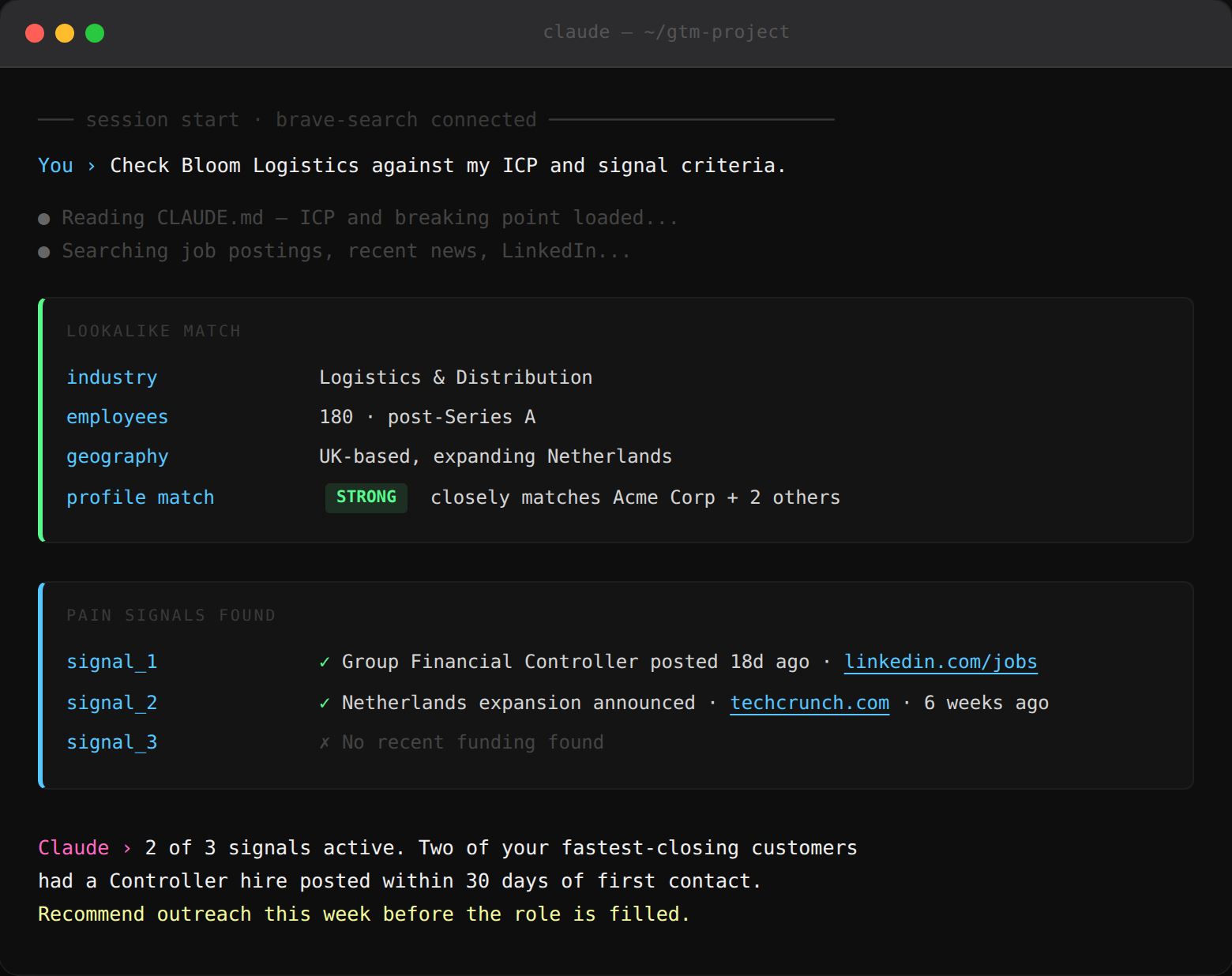
Example output:
2. The contact finder: right person
Requires: a scored account list and lead enrichment tool connected as an MCP server in your Claude Code session.
Once you know a company is worth reaching, you need the right person inside it. This is where a lead enrichment tool like Apollo or Prospeo comes in. Rather than searching manually, you call it directly from your Claude session and it returns verified contact data without leaving the terminal.
To connect lead enrichment as an MCP server, you need an API key and Claude Code installed.
You can learn everything about it in the Lead Enrichment Guide.
Example input:
You are a GTM researcher running contact enrichment.
Apollo MCP is connected to this session.

For each company listed below, call Apollo MCP to find
the best contact matching this profile:

Champion title: [e.g. VP Finance / Head of Finance]
Buyer title: [e.g. CEO / CFO]
Always prioritise the Champion. If not found, try Buyer.

For each contact found, return:
- Full name and exact current title
- Verified email address (Apollo verified only,
  write UNKNOWN if not verified)
- Direct phone number if available in Apollo
- Mobile number if available in Apollo
- LinkedIn URL
- Company domain

If Apollo returns multiple matches, take the most
senior person whose title most closely matches
the Champion definition.

Do not guess or construct contact details manually.
Write UNKNOWN for anything Apollo cannot confirm.

Companies to enrich:
[paste company names and domains here]
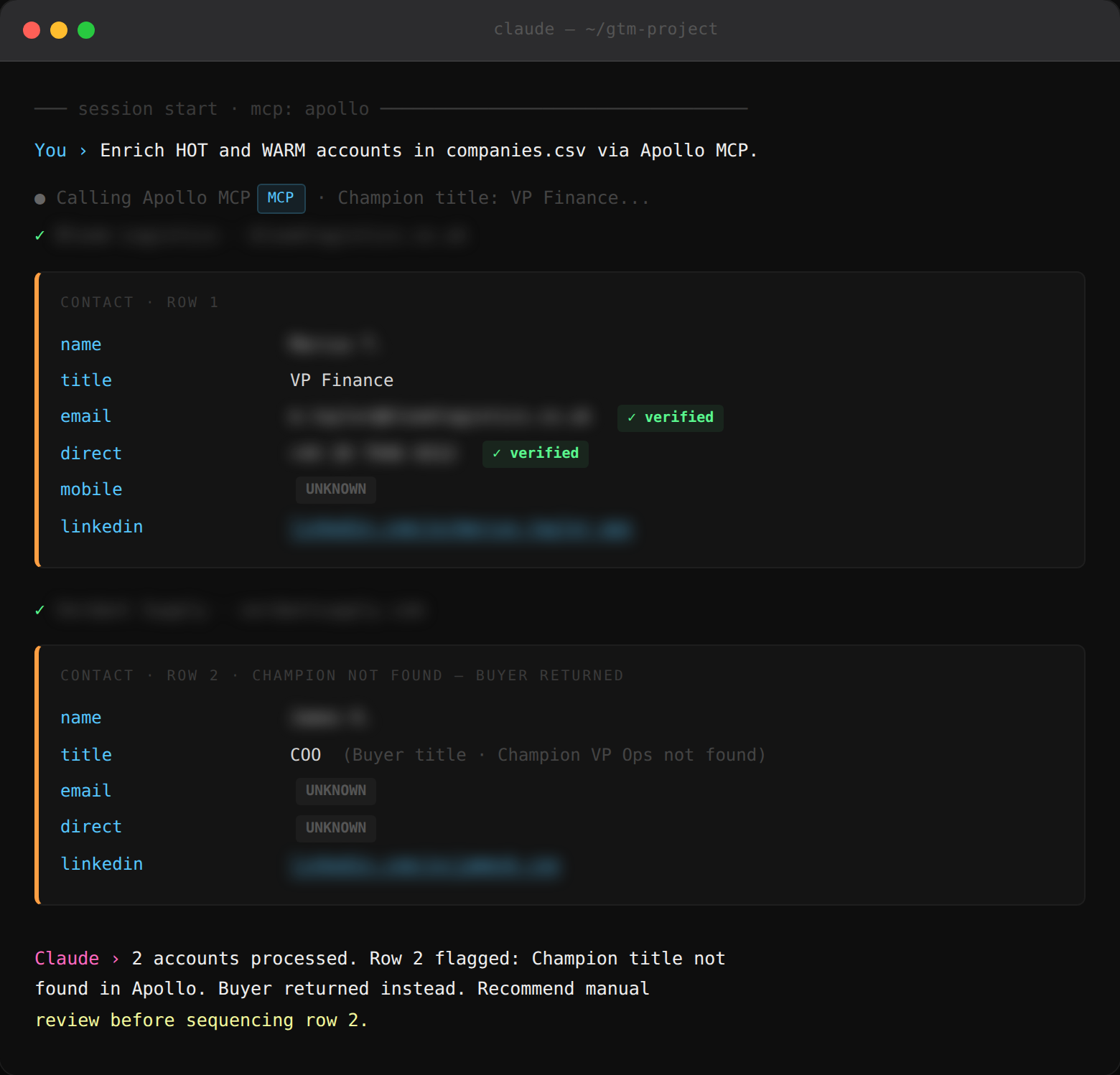
Example output:
3. The YYY email: right message
Requires:
a specific buying signal
one credible proof point
a low-friction offer ready to reference
a clear understanding of the YYY Framework (Why Them, Why You, Why Act)
The YYY Framework answers three questions every cold email needs to land in under ten seconds.
Why Them? why is this relevant right now.
Why You? why should they believe you.
Why Act? what is the easy next step.
All three inputs matter equally:
The signal does the personalisation.
The proof point does the credibility.
The offer gives them somewhere to go that doesn’t feel like a commitment.
A weak offer kills a strong email. Make sure what you are offering is something your buyer would want even if they had never heard of you.
You can learn everything about cold email copy in the Email GTM Guide.
Write a cold email using the YYY Framework.

WHY THEM: [paste the specific signal you found,
e.g. "They posted a Head of Finance role 3 weeks ago
and have two open controller positions unfilled"]

WHY YOU: [paste one proof point (with one number),
e.g. "We made a similar team cut month-end close
from 9 days to 3 after a similar hire"]

WHY ACT: [paste your low-friction offer,
e.g. "A short video showing the exact reconciliation
setup they used — no pitch, just the workflow"]

Constraints:
- Under 80 words
- One sentence per line, mobile-optimised
- No pleasantries like "I hope this finds you well"
- No meeting request in Email 1
- Subject line: 3 options, lowercase, 2-4 words
- Sign off: first name only

Then run the internal email test: could a real person
send this to a colleague without it feeling like
a sales email? If not, rewrite until yes.
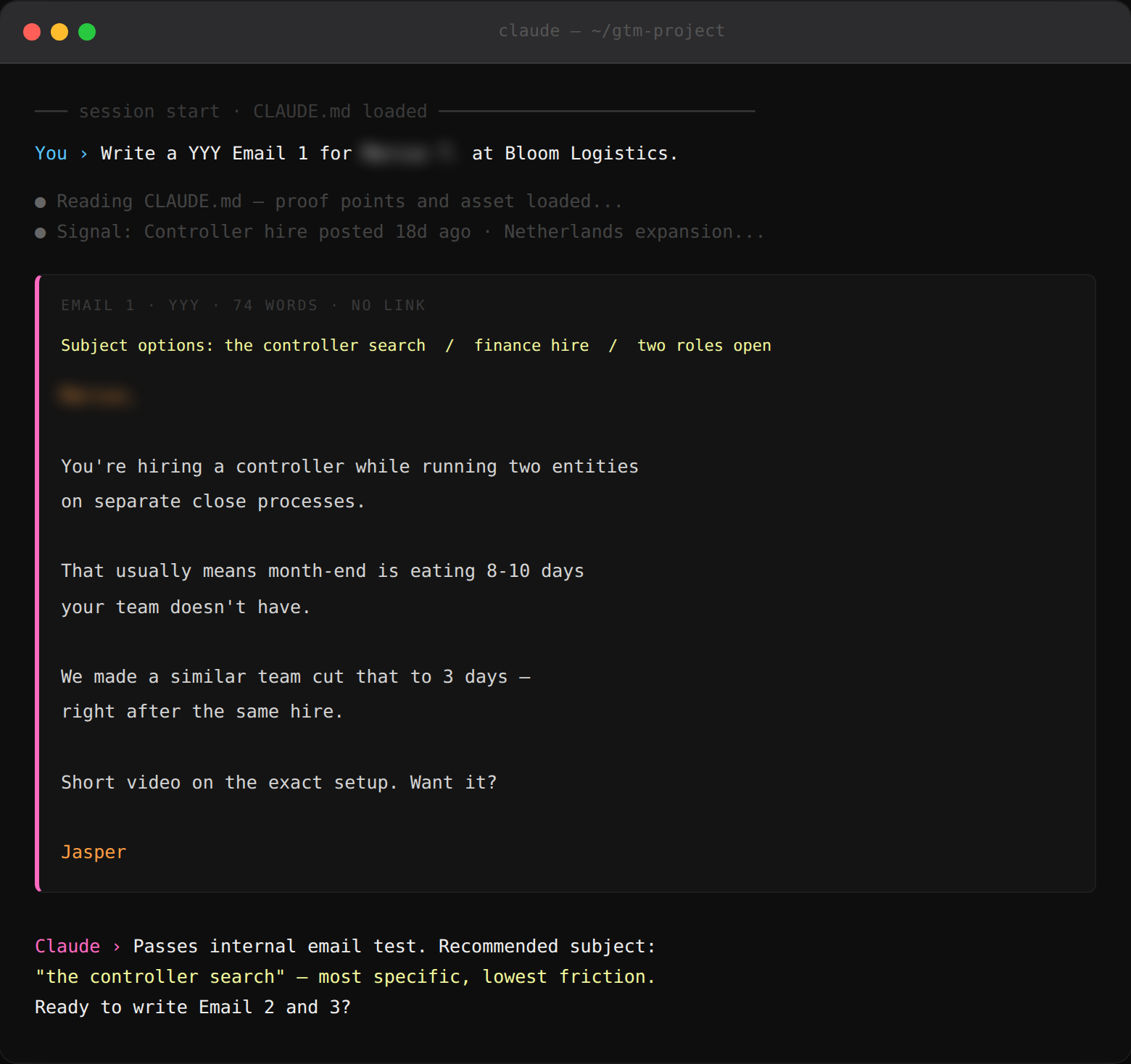
Example output:
Takeaway
Right place, right person, right message. That’s the whole logic of GTM, and Claude can help you work through each layer if you give it the right raw material first.
A vague brief produces vague output at every step. Give it the signal, the breaking point, and a real proof point, and the output changes completely.
If you want these prompts built around your specific ICP, your actual signals, and your proof points, just reply to this email.
Sincerely,