



In part 1 of this GTM build report, we built the foundation: email infrastructure: 14 domains, 50 mailboxes, warmed up and ready to send.
Here are the maths that turned into the biggest lesson of the whole project.
It wasn’t deliverability, and it wasn’t the copy.
It was the list. The first market we counted held only one month of leads.
The fix took a few weeks, since the ICP had room to widen.
The lesson took longer to sink in: run the maths before you size anything.
This is part 2 of the build. A new part at each phase, with the numbers, good or bad.
🗺️ The build in 7 phases
Phase 2: THE MARKET AND THE LIST
Phase 3: THE SIGNAL
Phase 4: THE COPY AND THE PAGES
Phase 5: LAUNCH AND FIRST SIGNALS
Phase 6: RUN AND FIX
Phase 7: RESULTS AND THE VERDICT
This part covers phase 2.
🏢 Quick recap: the client
A remote ecommerce marketing agency, around 60 people, selling retention services to Shopify brands.
Cold email had been switched off for a year, after 2 expensive tries that didn’t work.
The founder’s brief: “I just want to avoid very expensive tests.”
One line of maths
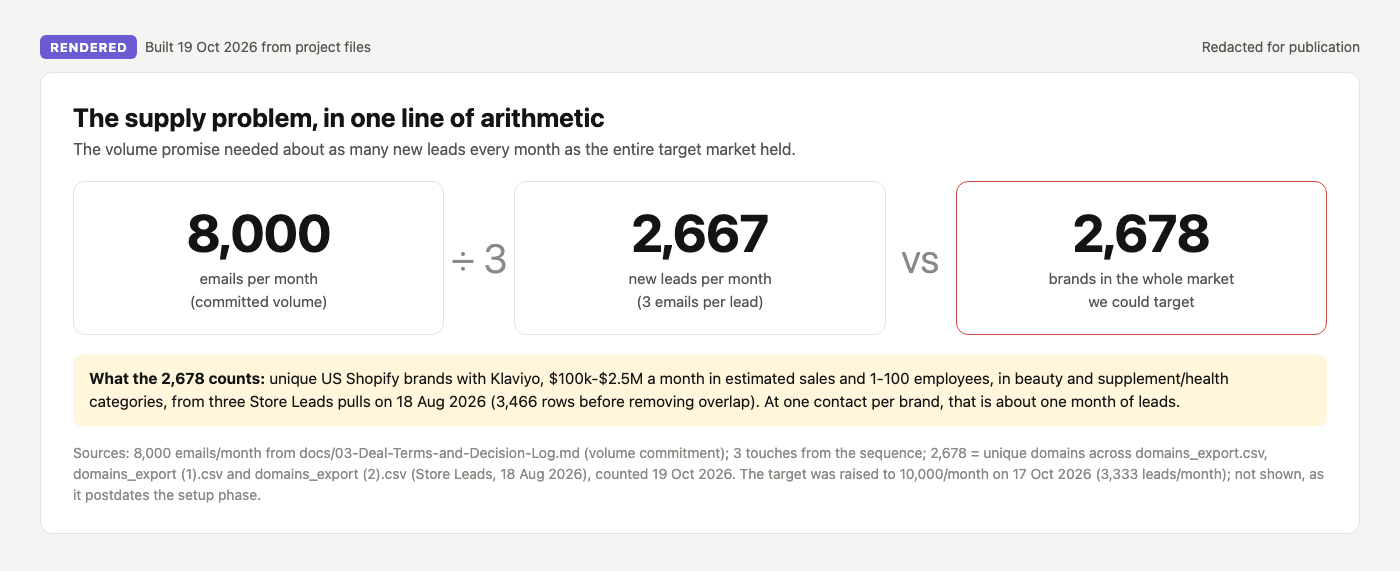
The agency committed to 8,000 emails a month. Each lead gets 3 emails. So:
8,000 ÷ 3 = about 2,667 new leads, every month
Then we counted the market: US Shopify brands with Klaviyo, in beauty and health, inside the agency’s revenue band and under 100 employees.
2,678 brands. In total.
The volume promise needed about as many new leads every month as the whole market held. One month of leads.
In September, the mailboxes ran at about 5% of the capacity they could send.
The spare capacity was fine. Domains burn in outbound, so spares always earn their keep.
And the fix was quick: we widened the ICP, which was too narrow. New categories, second contacts, a wider net. Step 7 shows all four moves.
The lesson is the order. Run the maths first, and you size the whole system to the market, instead of discovering the market after the promise.
🧰 Tech stack for this phase
Company data: Store Leads
Email finding: LeadMagic first, FullEnrich on the misses, Smartlead’s Smart Prospect as a last try
Email validation: LeadMagic and FullEnrich on their own results, MillionVerifier (built-in on Smart Prospect’s)
Dedupe: Smartlead’s global block list
Claude Code: connected to Store Leads and the email tools, running one skill from domain list to send-ready file
📍 Phase 2: The market and the list
Seven steps, from “how many leads do we need?” to a list that’s ready to send:
Count your market against your volume
Set the list gate in Store Leads
Pick one persona rule
Check every domain before you pay for data
Find the emails, then validate every one
Dedupe against everything live in Smartlead
When the market runs dry: 4 ways to find more
Below: every step in full, with what we did, what I’d do differently, and the prompts.
Inside:
The market-count prompt that tells you how many months of leads you have
The exact Store Leads filters we used
The homepage check that cut wrong brands from 69 to 22
The validation rules that kept bounces under half a percent
One batch, from 1,500 domains to 842 loaded leads
Download: the enrich-list skill for Claude Code
Phase 2, step by step
Step 1: Count your market against your volume
Do this before you promise a volume, and before you buy a single mailbox. Start at the money and walk back:
Extra revenue target ÷ average deal size = deals needed
Deals ÷ your close rate = sales opportunities
Opportunities ÷ your opp rate per meeting = meetings
Meetings ÷ your meeting rate per lead = leads to enrol per month
Leads × 3 emails each = emails per month, which sets your mailboxes and domains
Then count your market, and check it holds enough leads for that monthly number, for at least six months.
Run it in Claude Code, with your data source connected:
Size my cold email system backwards from revenue. Ask me
one question at a time:
- extra revenue I want from cold email in 12 months
- my average deal size and close rate from meetings
- my meeting rate per lead, if I know it (else use 1-2%)

Then work out, with the maths shown:
1. Deals, meetings and leads to enrol per month
2. Emails per month (3 per lead), and the mailboxes and
   domains that needs (30 emails per mailbox per day)
3. Using [your data source], count the companies matching
   my ICP: [industry], [size or revenue], [location],
   [required tech]. Assume 60% yield a verified
   decision-maker.
4. How many months of leads that is at my monthly number.

If it's under 6 months, tell me which filter to widen
first, and what that does to fit. If my revenue target
needs more leads than the market holds, say so plainly.
Under six months of leads? Widen the ICP now, in order of least fit lost.
We did it in week three instead of week zero, and the system ran at 5% of capacity while the new segments spun up.
More on building a list from scratch: Build Your List With Claude Code.

Step 2: Set the list gate in Store Leads
The filters we used: