

The majority of founding teams running their Go-To-Market through Claude are using maybe 10% of what it can do.
It’s not because a lack of effort. They just haven’t used Claude’s Skills properly.
Skills have been available since October 2025 and most teams are still missing them, which is why every Monday morning still feels like rebuilding the system from memory.
Once I created my first one, building a fresh prospect list took ten minutes instead of ninety.
Writing a world-class cold email took two minutes instead of fifteen.
Reviewing six months of closed deals to find what my best clients had in common happened in a single command, instead of an afternoon with a spreadsheet.
The thinking happened once, when I wrote the Skill. Every run after that was simply execution.
Quick Note On What This Covers
Skills work in both Claude and Claude Code in your terminal. The file format is identical, but what each one can do is different.
Skills in Claude run inside the chat: research, drafting, single-company briefs.
Skills in Claude Code run on your PC they read your CSVs, update your CLAUDE.md, call MCP servers like Apollo and Brave Search, and save files back to your project folder.
This article and every GTM Skill in Founder’s GTM focuses on Claude Code. If you have not set it up yet, the Account List Builder walks you through it first.
What a Skill actually is
A Skill is a saved workflow that lives in a folder inside your Claude Code project.
It tells Claude exactly how to do one specific job: which files to read, which steps to follow, what to output, what to skip.
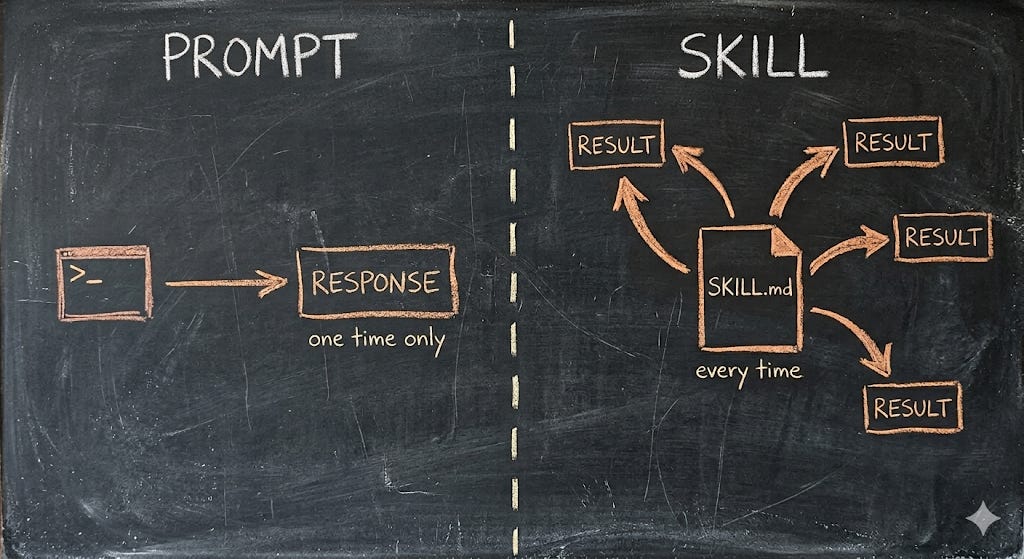
You write it once. Every time you want Claude to run that job again, you type one command and Claude follows the instructions.
The clearest way to understand a Skill is to compare it to the two things you are probably already using if you’ve played with Claude Code:
A prompt is a one-off. You type it, Claude does the work, the session ends, and the instructions are gone.
A CLAUDE.md is your project’s permanent operating manual that loads automatically in every session: your ICP, your no-go list, your rules, the background context that applies to everything you do in that folder.
A Skill sits between them. It loads only when you ask for it, or when Claude decides it is relevant to the task at hand. One specific job, one specific output, available on demand.
Without Skills, every workflow lives in your head or in a notes file you copy and paste at the start of each session. With Skills, every workflow lives in a file Claude reads automatically when you call it.
The Account List Builder uses a Skill called /list-builder. Every system in the Founder’s GTM System Library ships at least one. Each one is a folder, each one is a file, and each one runs identically every time.
The Anatomy Of A Skill
Here’s what a Skill folder actually looks like on your PC:
.claude/skills/quick-brief/
├── SKILL.md              ← the instructions
└── references/
    └── good-briefs.md    ← optional supporting material
Only SKILL.md is required. Everything else is optional. Reference files, examples, templates, anything you want Claude to read when running this specific Skill lives in subfolders and loads only when needed, which keeps your session lean.
The SKILL.md itself has two parts:
A short YAML frontmatter block at the top (description).
Plain markdown instructions below.
The frontmatter tells Claude what the Skill is called and what it does:
---
name: quick-brief
description: Produce a one-page outreach brief for a single company. Pulls recent news, hiring signals, and the most likely person to contact.
---
The description matters more than it looks. Claude reads it at the start of every session to decide whether to load this Skill automatically when relevant.
A weak description means the Skill never gets used. A sharp description means Claude finds it for you the moment a related task comes up.
Everything after the frontmatter is your instructions in plain English: the steps Claude follows, the inputs it needs, the outputs it produces, the edge cases it should handle.
Why This Matters For GTM
Three reasons Skills change how founders run outbound: repeatability, compounding and speed.
The first is repeatability. Every prospect list scores the same way, every email follows the same logic. The output last Monday and the output this Monday are produced by the same instructions, which means your system stops being something you “do well when you have time” and becomes something that just happens.
The second is compounding. Each Skill you write makes the next one cheaper. Reference files get reused across multiple Skills. The signals you document for the list builder feed into the hook writer. Three months in, you have a library that works for your business specifically, not a generic GTM stack lifted from someone else’s playbook.
The third is speed. A workflow that took ninety minutes the first time runs in ten once the Skill exists. The system survives a busy week, which is the only kind of week founders have.
Build Your First GTM Skill In 15 Minutes
This is a working Skill you can paste into your project folder today, called Quick Brief.