

There’s a direction problem at the heart of today’s outbound prospecting.
You start by describing who you want to find. Industry, company size, job title, geography.
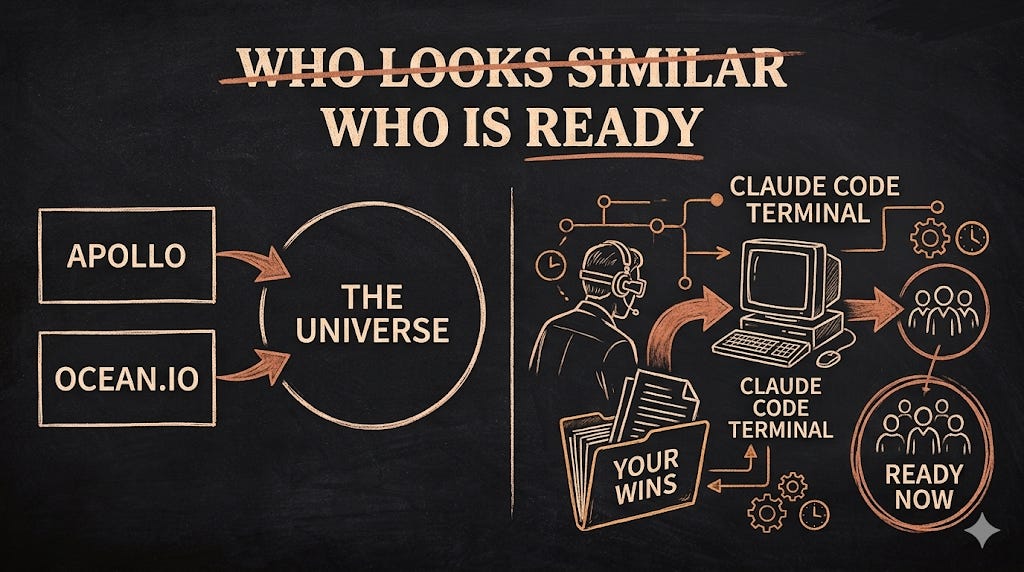
Then you run it through Apollo, or you use Ocean’s lookalike feature to find companies that behave similarly to your best customers.
Your list looks right on paper, but the close rate tells a different story.
The problem is that you’re working forwards from a description of who your buyer is, before you understand why your best customers actually bought.
A fintech CFO at a 120-person company looks identical to another fintech CFO at a 120-person company on any lookalike search. But one of them just hired a Head of Finance, closed a Series B two months ago, and has three G2 reviews mentioning reporting chaos.
The other has been quiet for six months. Both match your ICP. Only one of them is ready.
The tools aren’t the problem
The lookalike tools have never been better. Apollo matches on firmographics at scale. Ocean goes a layer deeper, using NLP to match on what companies actually do rather than just how they are categorised.
Both have MCP servers, which means they connect directly to Claude without exporting a single CSV.
But there’s a ceiling on what any lookalike tool can do, because they all work from the outside in.
They can tell you who looks like your best customers. What they can’t tell you is who is in the same situation your best customers were in when they first bought.
That information does not live in any public database, because it lives in your closed-won deals, your call notes, and your CRM.
Lookalike tools like Apollo and Ocean.io both integrate with HubSpot, so they can technically sync your CRM data. But what they read from it are structured fields: company, title, deal stage, last activity.
Claude reads the unstructured layer: the call notes, the deal context, and the exact words your buyer used when they described the problem. That’s where the pattern lives, and no integration brings it up automatically.
The four-step system
Step 1: Feed Claude Code your wins
Pull together your five to ten best customers. Best means fastest to close, highest deal value, lowest churn, or best fit.
For each one you need:
What the company does and its size
The role of the person who signed off
What triggered the conversation in the first place
What they said the problem was in their own words
Step 2: Ask Claude Code to find the pattern
Before asking it to build a list, you are asking it to read your customer data and identify what those companies had in common that your firmographic ICP does not capture.
The prompt:
You are a senior GTM analyst. Read all files in /customers/
carefully before responding.

Your task is to identify the behavioural and situational
patterns that preceded conversion across these deals.
Not firmographics — those are already known.

For each deal, extract:
- What was happening inside the business in the 30–90 days
  before first contact
- What organisational signals were present at the time
  the buyer first responded
- What the buyer said the problem was, in their own words
  (quote directly where available in the notes)
- Any external trigger events: new hires, funding rounds,
  expansions, regulatory changes, product launches

Then look across all deals and identify:
1. The 3–5 signals that appeared in your fastest-closing deals
2. Any signals present in every deal that converted,
   but absent or rare in deals that stalled
3. The earliest public signal that would have predicted
   each conversion, and where it would have been visible

Output a pattern document with four sections:
CORE SIGNALS (present in 4 or more deals)
SUPPORTING SIGNALS (present in 2–3 deals)
EARLY WARNING SIGNALS (publicly searchable, specific enough
  to use as search criteria)
SIGNALS TO IGNORE (appeared in the data but did not
  correlate with conversion speed)

For each signal, include the exact language I can use
as a search string or job posting keyword.
The output is a pattern document, not just a list. You are building a brief before you build anything else.
A founder I worked with sells workforce scheduling software to mid-sized logistics and distribution companies. His firmographic ICP was Operations Directors and VP Supply Chain at businesses with 200 to 800 employees across the UK and Netherlands. Accurate but generic.
When Claude read his six closed-won deal notes, it found three things every single one had in common at the moment of first contact:
A new warehouse or fulfilment site had opened in the prior four months.
At least two shift coordinator roles had been posted and reposted, suggesting high turnover or failed hires.
The company had won a new retail or e-commerce contract within the last six months, visible from a press release or LinkedIn announcement.
When we rebuilt his list around those three signals and sent to 52 accounts instead of 380, his reply rate went from 0.9% to 4.6%. The list shrank, but the results did not.
Step 3: Turn the pattern into signal criteria
Now you have something specific to search for.
Not “fintech companies with 50–200 employees”, but “fintech companies that recently hired a Head of Finance and have been posting the same RevOps role unfilled for 60 days”, because that combination appeared in four of your last five fastest-closing deals.
Feed the pattern document into your CLAUDE.md and every list you build from here picks up those signal criteria automatically. That’s where the system starts compounding.
Step 4: Build the scored list
Run the full workflow in one Claude Code session. If you have existing customer domains to seed from, call Ocean via MCP first to build the universe. If you are starting without that, go straight to the scoring step using Brave Search.
The prompt:
You are a senior GTM researcher. Read /customers/pattern.md
in full before doing anything else.

Load the CORE SIGNALS and EARLY WARNING SIGNALS into
your working memory. Every qualification decision in this
session is driven by those criteria, not just the
firmographic ICP.

STEP 1: BUILD THE UNIVERSE
If seed URLs are provided below, call Ocean.io MCP to run
a lookalike search against those domains.
If no seed URLs are provided, search directly using the
EARLY WARNING SIGNALS as search criteria via Brave Search.

Seed URLs (leave blank if none): [paste best customer domains]

STEP 2: QUALIFY EACH COMPANY
For every company in the results:
- Search their current job postings for language that
  matches the EARLY WARNING SIGNALS in the pattern doc
- Search recent news for trigger events from the last
  90 days (funding, new hires, expansions, acquisitions)
- Check their website and LinkedIn for the organisational
  signals listed under CORE SIGNALS

STEP 3: SCORE EVERY COMPANY
HOT: 3 or more core signals confirmed from public sources,
     at least one trigger event from the last 30 days
WARM: 1–2 signals confirmed, or strong structural fit
      with no recent trigger
COLD: matches WHO criteria on paper but no signal
      evidence found from any public source

STEP 4: DOCUMENT EVERY ROW
For each company, write one specific sentence in
why_fit_evidence that names what you found, where you
found it, and when. Not "fits ICP". A dated, sourced,
specific observation. If you cannot write that sentence,
do not add the row.

STEP 5: ENRICH AND SAVE
For HOT and WARM accounts, call Apollo MCP to pull
verified contacts at these titles: [your target titles]

Save to prospect-list.csv with columns:
company, domain, signal_score, signals_found,
why_fit_evidence, contact_name, contact_title,
email, linkedin_url

Save after every 10 rows. Target: [X] companies this session.
The output has two layers of qualification: it looks like your best customers from the outside, and it shows the same signals that preceded conversion. A firmographic search gives you the first layer. This gives you both.
So, do you really need all those tools mentioned to run this system?
Claude Code and Brave Search handle almost everything. Brave Search has a free tier that covers most founding team workflows at this volume.
Apollo becomes useful at two points: in Step 4 if you want to seed a lookalike search from existing customer domains, and after the list is scored, to pull verified contact data for your HOT and WARM accounts.
That second use case is the more common one. You were going to need an enrichment tool at some point anyway, and Apollo is a cost-effective option for verified emails and direct dials at scale.
Ocean is only relevant if you want NLP-based lookalike matching for niche verticals where Apollo’s category filters are too broad.
What this does to your outreach
When the list is built from your best customers, the Why Them? hook stops being an observation and becomes a recognition.
You aren’t just saying “I noticed you raised a Series B.” You are saying they are showing the same three signals that appeared in every company we worked with before they realised they had this problem.
It’s the difference between reaching people who match your ICP on paper and reaching people who are living the problem you solve right now.
Takeaway
Lookalike tools answer the question: who looks like my best customers?
Claude answers the question: who is in the same situation my best customers were in when they first bought?
Those are different questions. The first builds a list of profiles. The second builds a list of moments.
Three things to do before this disappears from your inbox:
Pull your five best closed deals and write down what triggered each conversation
Ask yourself whether any of those triggers exist as criteria in your current list-building process
If the answer is no, that is where to start
Sincerely,
PS: Want to be able to run this yourself? The Claude Code Account List Builder has everything you need:
A CLAUDE.md template that turns your closed-won data into a reusable signal brief
A /list-builder Skill that scores your universe automatically so you never manually sort a spreadsheet again
The full MCP setup for Apollo and Ocean so the entire workflow runs in one terminal session, start to finish
Get instant access here.